For this in-depth review, I downloaded and tested all of the Monero wallets I am about to present to you. I have ranked these wallets based on my rating methodology and what I consider to be most useful to you, the user, and not based on affiliate commissions like other sites do.
We’re going to go deep here and I’m going to share with you everything you need to know to make an informed decision as to whether or not you want to use a particular wallet for managing your XMR.
We’ll be covering many things in this review, including the user interface and the overall user experience for each Monero wallet. We’ll also cover the privacy and safety of the wallets. Are these wallets safe to store your XMR on or could they be hacked? We’ll be taking a look at the special features of each wallet and what makes them stand out.
I will also include a comprehensive table that shows you how each Monero wallet compares against the others based on the overarching themes of ease of use, security & privacy, features, and fees.
Let’s get started.
Bottom line
The Monero GUI Wallet is the official wallet recommended by the Monero community. This is a desktop wallet that allows you to store, send, and receive Monero only. However, the highest-scoring wallet according to my rating methodology is Exodus. Exodus is a publicly traded company that offers a multi-crypto wallet with many nifty features such as an inbuilt crypto trading interface and the ability to buy crypto with a debit or credit card. Finally, if you plan on storing a large amount of XMR you should consider a cold storage wallet such as a Ledger or Trezor device both of which scored high in my research.
List of Best Monero Wallets
- Monero GUI Wallet: official desktop wallet recommended by Monero
- Monero CLI Wallet: officially software for developers
- Cake Wallet: multi-crypto cross-device wallet endorsed by Monero
- Monerujo: an Android wallet endorsed by Monero
- Feather: a desktop app endorsed by Monero
- Monero.com: Monero-only version of Cake wallet
- Edge Wallet multi-crypto mobile wallet endorsed by Monero
- Mymonero.com cross-device XMR wallet endorsed by Monero
- Zelcore multi-crypto cross-device wallet
- XMRWallet popular web-only Monero wallet
- Exodus, a well-established multi-crypto cross-device wallet with Web3 features
- Guarda newer multi-crypto cross-device wallet with Web3 features
- Stack Wallet newer multi-crypto cross-device wallet
- Elite Wallet: like Cake but preserves privacy better
- Freewallet a custodial wallet
- Coinpayments for merchants
- Rino Wallet for enterprises
- Atomic wallet multi-crypto cross-device wallet
- Ledger is considered the most secure hardware device
- Trezor secure hardware device
- Paper wallets where you write everything on a piece of paper.
In the table below scroll to the right to see all columns.
Monero wallets feature comparison
| Wallet | Rating | Devices | Multi language | Multicrypto | Exchange tab | Staking | Multisig | Hardware wallet enabled | Unique features | Buy crypto with fiat | NFT gallery | UX | Open-source | Non-Custodial | Additonal Fees | Web 3 intergation |
|---|---|---|---|---|---|---|---|---|---|---|---|---|---|---|---|---|
 |
3.5/5 |
All | ✘ | ✓ | ✓ | ✓ | ✓ | Ledger | Token generator, Prepaid visa car, Lending facility | ✓ | ✘ | 4/5 | ✘ | ✓ | Lending fees: 12-17% APR Prepaid visa card: 1.5% to top up and 2.5% to convert crypto to fiat | ✓ |
 |
4.5/5 |
All | ✓ | ✓ | ✓ | ✓ | ✘ | Trezor | Web 3 browser | ✓ | ✓ | 5/5 | ✘ | ✓ | $4/month for premium users | ✓ |
 |
3/5 |
All | ✓ | ✓ | ✓ | ✘ | ✘ | Trezor & Ledger | FluxNodes management | ✓ | ✓ | 2/5 | ✘ | ✓ | ✓ | |
 XMR Wallet XMR Wallet |
2/5 |
Web-based | ✓ | ✘ | ✘ | ✘ | ✘ | ✘ | ✘ | ✘ | 4/5 | ✓ | ✓ | ✘ | ||
| Monero GUI |
2.5/5 |
Desktop app | ✓ | ✘ | ✘ | ✘ | ✘ | Trezor & Ledger | Option to download full node | ✘ | ✘ | 5/5 | ✓ | ✓ | ✘ | |
| CLI |
2/5 |
Desktop app | ✓ | ✘ | ✘ | ✘ | ✓ | Trezor & Ledger | Option to download full node | ✘ | ✘ | 1/5 | ✓ | ✓ | ✘ | |
 Monerujo Monerujo |
2.5/5 |
Android app | ✓ | ✘ | ✘ | ✘ | ✘ | Ledger | Pay XMR to BTC addresses using SideShift.ai | ✘ | ✘ | 4/5 | ✓ | ✓ | ✘ | |
 Feather Feather |
2/5 |
Desktop app | ✘ | ✘ | ✘ | ✘ | ✓ | Trezor & Ledger | Advanced features to connect to remote node and more | ✘ | ✘ | 3/5 | ✓ | ✓ | ✘ | |
 Monero.com Monero.com |
3/5 |
All | ✓ | ✘ | ✓ | ✘ | ✘ | ✘ | Monero only version of Cake wallet | ✓ | ✘ | 4/5 | ✓ | ✓ | ✘ | |
 Edge Edge |
3/5 |
iOS & Android app | ✘ | ✓ | ✓ | ✘ | ✘ | ✘ | Loan facility via Aave expected soon | ✓ | ✘ | 4/5 | ✘ | ✓ | ✘ | |
 MyMonero MyMonero |
3/5 |
All | ✓ | ✘ | ✓ | ✘ | ✘ | ✘ | ✓ | ✘ | 4/5 | ✘ | ✓ | ✘ | ||
 Ledger Wallet Ledger Wallet |
4.5/5 |
All | ✓ | ✓ | ✓ | ✓ | ✘ | ✓ | Secure Element chip makes is hard to hack | ✓ | ✓ | 4/5 | ✘ | ✓ | Ledger Nano S Plus: $79-82 Ledger Nano X: $149-155 Ledger Stax: $279Ledger Recover: $10 per month (optional) | ✓ |
 Trezor Wallet Trezor Wallet |
4/5 |
All | ✓ | ✓ | ✓ | ✓ | ✘ | ✓ | Shamir recovery | ✓ | ✘ | 4/5 | ✓ | ✓ | Trezor One: $69 Trezor Model T: $219 Trezor Safe 3: $79 | ✘ |
 Elite Wallet Elite Wallet |
3/5 |
iOS & Android app | ✓ | ✓ | ✓ | ✘ | ✘ | ✘ | Uses proxies to hide IP | ✘ | ✘ | 4/5 | ✓ | ✓ | ✘ | |
 |
3/5 |
iOS & Android app | ✘ | ✓ | ✓ | ✘ | ✘ | ✘ | Option to create backup password | ✓ | ✘ | 4/5 | ✓ | ✓ | ✘ | |
 Atomic Wallet Atomic Wallet |
2.5/5 |
All | ✓ | ✓ | ✓ | ✓ | ✘ | ✘ | ✓ | ✓ | 4/5 | ✘ | ✓ | ✘ | ||
 Freewallet Freewallet |
3/5 |
iOS & Android app & Web | ✓ | ✓ | ✓ | ✘ | ✓ | ✘ | Gift cards and prepaid phone top up | ✓ | ✘ | 4/5 | ✓ | ✘ | 10$/month after a year of active use plus exchange fees and sending fees | ✘ |
 Coinpayments Coinpayments |
3/5 |
iOS & Android app & Web | ✓ | ✓ | ✓ | ✘ | ✓ | Trezor | Merchant payments | ✓ | ✘ | 3/5 | ✘ | ✘ | 0.5% above $15,000/month | ✘ |
 Rino.io Wallet Rino.io Wallet |
1/5 |
Web-based | ✘ | ✘ | ✘ | ✘ | ✓ | ✘ | Enterprise features such as approver roles | ✘ | ✘ | 2/5 | ✓ | ✓ | Undisclosed | ✘ |
 Cake Wallet Cake Wallet |
3.5/5 |
All | ✓ | ✓ | ✓ | ✘ | ✘ | ✘ | Cake Pay for US users is a marketplace for gift cards | ✓ | ✘ | 4/5 | ✓ | ✓ | ✘ |
20 Best XMR Wallets
For my research, I split wallets into two groups
- Those that are endorsed by the official Monero team on GetMonero.org and
- Other wallets I dug up in my research that Monero users are recommending on Reddit and other social media.
Official Monero software wallets
The wallets developed by the core developer team of Monero are available to download on getmonero.org.
The first two are the official software wallets.
#1. Monero GUI Wallet
Rating: 2.5/5
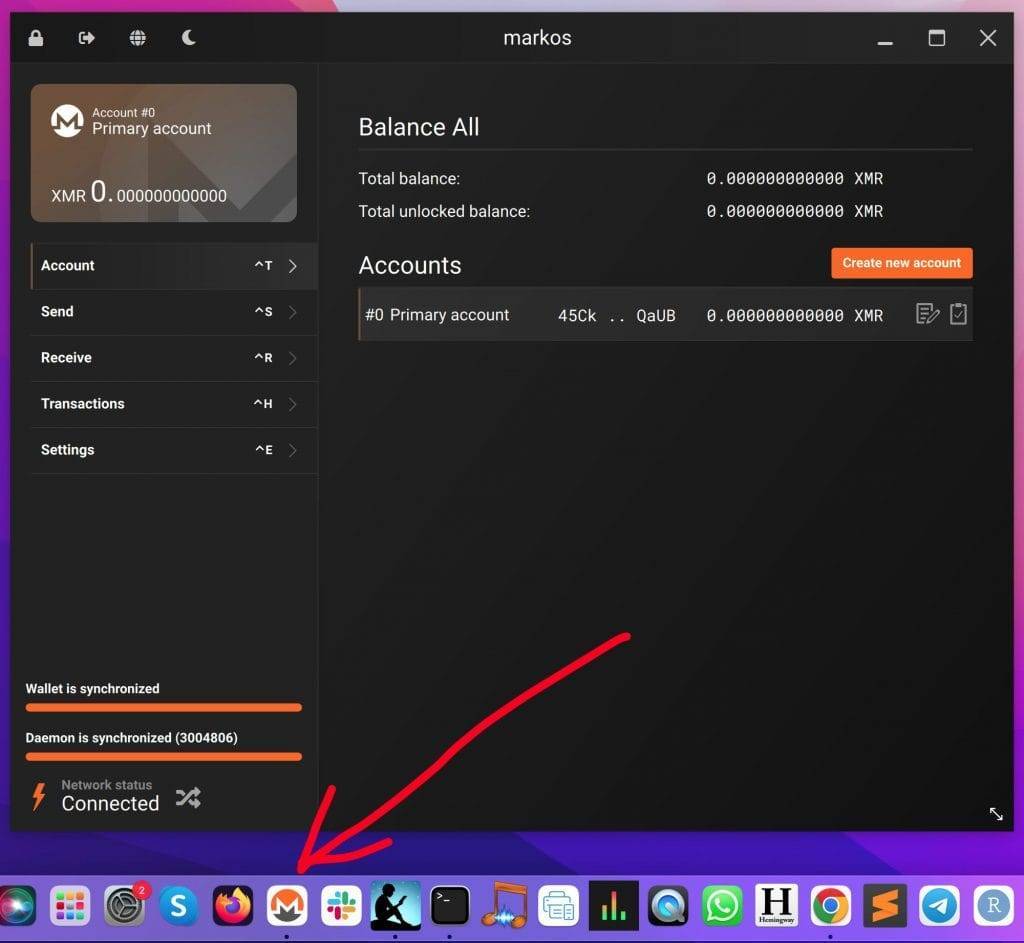
The GUI (Graphical User Interface) wallet is an official software wallet developed by the Monero community that is aimed at non-programmers.
For those of you who don’t know what a GUI is, it provides an app-like experience so that you can click on buttons instead of typing code to use it.
Here is what the Monero GUI wallet looks like on my Mac:
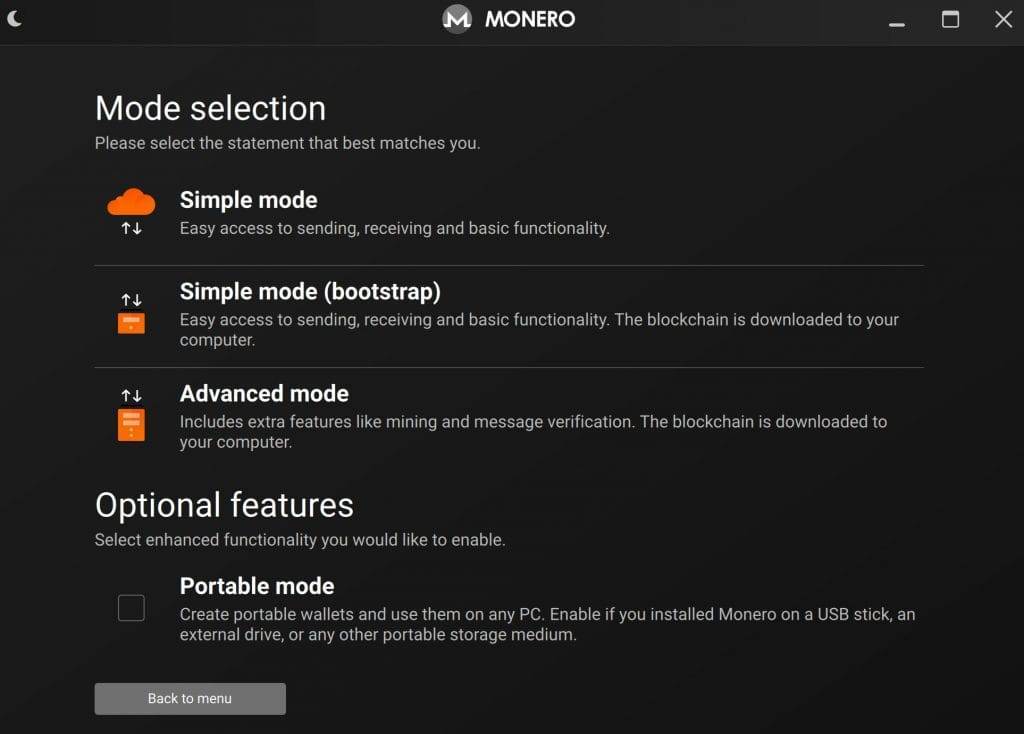
The GUI wallet is available in 3 modes:
- Simple mode: Using simple mode is the fastest way to set up your wallet and store, send, or receive your XMR. Use this mode for managing small amounts of XMR. From a technical perspective what is happening is that your wallet is connecting to a remote node. A remote node is just a computer that has downloaded the whole Monero blockchain. For small amounts, it doesn’t make sense to download the whole blockchain to your computer since it’s over 90 GB. Be aware that the simple mode does expose you to more risk though as malicious nodes could compromise your privacy. For example, they could track your IP address or gain information on the private transactions you make.
- Simple mode (bootstrap): Your computer will download the full blockchain in this mode. Because this can take a few hours or days your wallet will connect to a remote node in the interim so that you can use it. It will also connect to a remote node whenever your blockchain is not synchronized with the main one. This is a good tradeoff for people who care about privacy but want to be able to use the wallet immediately.
- Advanced mode: This mode is for those who want to have full control of their privacy. It is also for those who want to solo mine Monero (see Monero mining pools for more on this topic). In addition, there are more advanced features. For example, in this mode, you can prioritize specific Monero transactions by bidding higher fees. In advanced mode, you can choose to either connect via a remote node or download a full node locally.
Features
- Available to download on desktop for Windows, macOS, and Linux
- Light and dark mode
- You can only use Monero(XMR) with this wallet
- Supports 37 Languages: English, German, Esperanto, Spanish, French, Swedish, Croatian, Hungarian, Hindi, Bahasa, Italian, Japanese, Dutch, Polish, Portuguese, Russian, Chinese, Korean, Hebrew, Taiwanese, Romanian, Danish, Serbian, Slovenian, Czech, Catalan, Turkish, Ukrainian, Lithuanian, Finnish, Bulgarian, Norwegian, Afrikaans, Greek, Tamil, Vietnamese, Icelandic
- Both remote node and local node availability
- Beginner and advanced user modes
Pros
- The GUI wallet is open source which means it’s more transparent and secure as many eyes on the code can address vulnerabilities
- Officially supported, maintained, and recommended by Monero developers
- Easy to install and use with clear instructions provided by the wizard
- Option to download full-node wallet for maximum privacy
- Option to connect to a hardware wallet such as a Ledger or Trezor wallet.
- You can save frequently used addresses under an address book tab
- Self-custodial wallet: you own your private keys which are encrypted on your device.
Cons
- Not available on mobile which means you can’t use the wallet on the go. In my research, many Monero specialists feel this is a good thing as you are way more exposed to getting hacked with a phone than with a desktop device.
- The remote node option means you compromise on privacy and are dependent on the reliability of other nodes.
- If you download the whole node it means you have to have at least 90GB in your hard drive available. I know I don’t have that kind of space.
- Synchronization delay: when you first open the wallet you need to wait about a minute for it to synchronize with the remote node
- You can only store Monero and no other crypto coins on it. Again some Monero developers reached out to me pointing out that they consider this a good thing as offering multiple cryptos only adds complexity and increases the attack surface for someone looking to exploit vulnerabilities.
- Users on Reddit are reporting that there may be compatibility or performance issues when running the GUI wallet on certain Linux distributions, particularly those based on Arch Linux.
Fees
- There are no fees for using the Monero GUI wallet
- Like with all transactions you will need to account for blockchain network fees when you send or receive XMR but these are minimal.
Resources
- Guide available here. You will also get the guide when you download the software.
- Source code
For a more comprehensive GUI wallet review and how to use it see here.
The next wallet is also officially supported by Monero developers.
#2. Monero CLI Wallet
Rating: 1.75/5
CLI stands for Command Line Interface. This wallet is aimed at programmers who are comfortable typing and developing code. It requires users to input commands and parameters in text form, which may be intimidating for beginners.
This is what it looks like on my Mac:
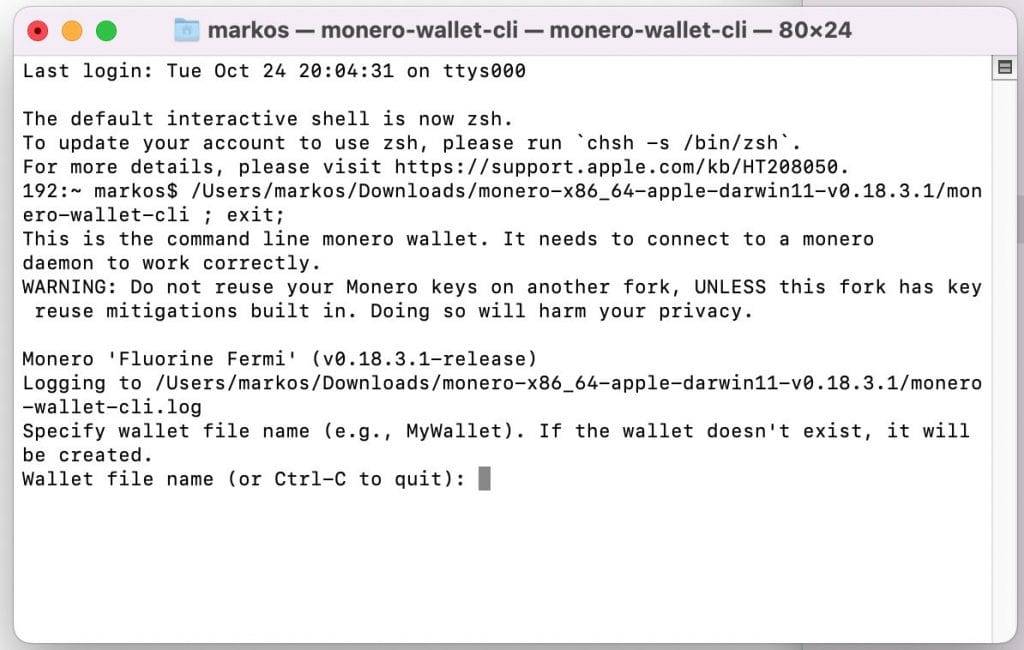
CLI wallet includes the features present in the GUI wallet, and it often receives new features and updates before they are integrated into the GUI.
The CLI wallet is preferred by users who need more control and automation, want to integrate Monero into scripts or applications, or have specific use cases that require a deeper level of customization and interaction.
Pros
- Developer friendly
- Offers the same modes as the GUI wallet
- Option to use pruning if you don’t have enough disk space i.e. to download only a third of the blockchain
- Hardware wallet integration available
- Option to get paid for operating a full node when your node is used by others
- Can perform transactions over Tor/I2P for added privacy
- Supports multisig which means you can set up your wallet to require more than one person’s approval for transactions to go through
Cons
- The CLI is way less user-friendly for non-developers
- Requires a steep learning curve
- Available via your PC or laptop only
- Plus all the same cons as the GUI such as not being able to manage other cryptocurrencies.
Fees
- Similarly to the Monero GUI wallet, there are no fees other than transaction fees.
That sums up the heavy-duty wallets for Monero.
In the following section, I will look at the officially recommended lightweight wallets.
Best Lightweight wallets for Monero
Apart from the two official software wallets, you will also find that getmonero.org recommends specific lightweight wallets.
A lightweight wallet uses a remote node but it is way easier to use.
First, I will review the local syncing wallets. These take longer to sync but you don’t share any wallet details with the remote node.
#3. Cake Wallet
Rating: 3.25/5
If you are looking for a light wallet that works on both Desktop and Mobile then Cake Wallet is your best choice. Cake Wallet is officially endorsed by Monero and if you make the rounds on the Monero subreddit you will find most people praising it.
Cake is a non-custodial wallet and supports setting up wallets for coins and tokens on the following blockchains:
- Monero (XMR)
- Bitcoin (BTC)
- Ethereum (ETH)
- Litecoin (LTC)
- Bitcoin Cash (BCH)
- Nano (XNO)
- Haven (XHV)
This doesn’t mean it only supports 7 coins. It means you can set up a crypto wallet for any of those 7 networks. For example, if you set up an Ethereum wallet you can send and receive ETH and ERC-20 tokens such as DAI, UNI, and USDT. Full guide here.
Features
- Available in 10 languages: English, Chinese, German, Portuguese, Spanish, Italian, Dutch, Japanese, Russian, French
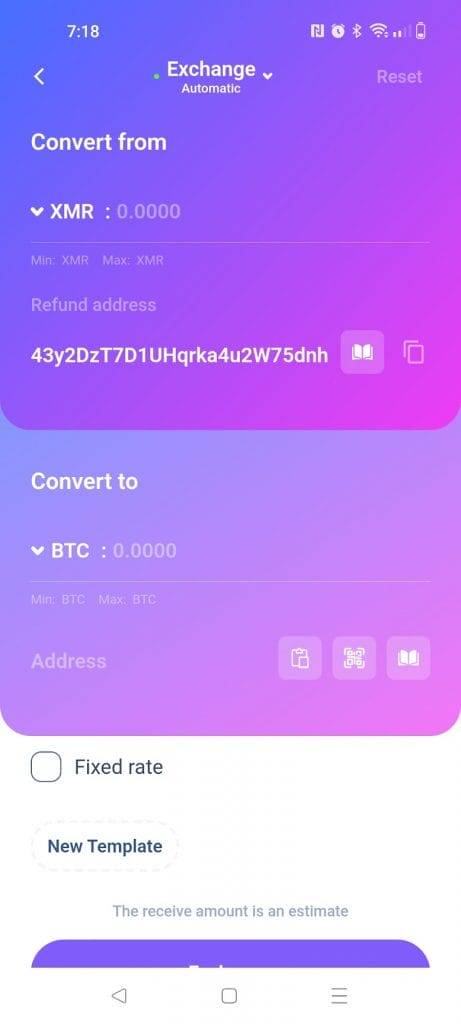
- Includes a built-in exchange where you can swap cryptocurrencies using third-party exchanges such as ChangeNOW or SideShift.
- Supports multiple coins and wallets across 7 blockchain networks.
- Open source
- Available on both Mobile and Desktop devices
- Fiat onramps
Pros
- Non-custodial: This means you have full control over your keys and coins and that all your information is stored on your device.
- Includes advanced option to connect to remote nodes of your own choice
- Designed in such a way that you only focus on one coin at a time, unlike other wallets that resemble your portfolio on exchanges and show all of them the same interface.
- Option to buy XMR with fiat currency directly from within the wallet using third-party payment providers such as Guardarian via multiple payment options such as Bank, credit card, Sepa Bank transfer, Google Pay, Debit card, SEPA instant, RevolutPay, Bankcontact, Giropay, iDEAL and Sofort.
- Cake Wallet will automatically create subaddresses for you. Subaddresses are a core feature of the Monero network. When someone sends you XMR you can provide them with a subaddress instead of your main address. The subaddress is linked to your main public address but this way the sender will never be able to know your main address.
- Integrates with Cake Pay for US users: a marketplace for prepaid cards and gift cards.
- Been around for over 5 years and is open source both of which signal it is trustworthy
- Includes an address book to organize frequent contacts
Cons
- The fact that it is lightweight means you can’t guarantee maximum privacy as you are dependent on external nodes.
- You need to make sure your wallet is synchronized. This can result in you troubleshooting and trying other nodes if you get stuck on syncing on the same block.
- Software wallets tend to get hacked from time to time so it isn’t the optimum solution to store your life’s savings on.
- They do not operate servers for two-factor authentication which does not protect you against sophisticated attackers.
- Not compatible with hardware wallets though in a recent comment, they said they are working on it.
Fees
- The wallet is free to use other than network fees for sending XMR
- You will need to pay third parties a fee plus a surcharge to Cake for using the built-in exchange or for buying crypto with fiat.
For more details and how to use it check out my full review of Cake Wallet.
#4. Monerujo Wallet
Rating: 2.25/5
Monerujo is an open-source XMR wallet for Android users. It’s only available to store Monero and is officially endorsed by the Monero team on their site.

Features
- This is a no-frills wallet that comes in light mode and dark mode
- Available on Android phones only
- 21 Languages: English, Catalan, German, Estonian, Spanish, Esperanto, French, Italian, Hungarian, Dutch, Norwegian, Portuguese, Romanian, Slovenian, Swedish, Greek, Russian, Ukrainian, Arabic, Japanese, Chinese
Pros
- Trusted open-source project which means it reduces the chance of there being backdoors in the code
- Non-custodial wallet which means you are in control of your assets and your keys
- Easy-to-follow set-up instructions
- Partners with SideShift.ai so that you can send Monero to other blockchain network addresses. For instance, you can paste a BTC, LTC, ETH, DASH, or DOGE address and pay in XMR while SideShift takes care of the conversion in the background.
- You can connect to onion nodes to prevent your internet service provider from knowing you are using Monero.
- Option to choose which node you want to connect to
- Ledger hardware wallet enabled
- Password protection option in addition to PIN/Fingerprint
- Background sync
- Simple no frills UI
- Ability to set up multiple nodes and wallets
Cons
- Some users are reporting that it is slower to open than Cake Wallet
- Not available on all devices such as iOS or desktop computers
- You can’t store or buy other cryptocurrencies on it like you can with Cake Wallet.
- Gets mixed reviews on the Play Store scoring 3.3 out of 5. Most of the complaints center around the user experience.
- Does not have two-factor authentication since it does not use a centralized server. Monero users, who value their privacy, will consider this a good thing.
Fees
- None other than the network fees for sending XMR.
Resources
- Download Monerujo on your Android
- GitHub
- Monerujo official website
- Guides and manuals
- Monerujo privacy policy
Check out the Monerujo comprehensive review for a more in-depth evaluation.
#5. Feather
Rating: 2/5
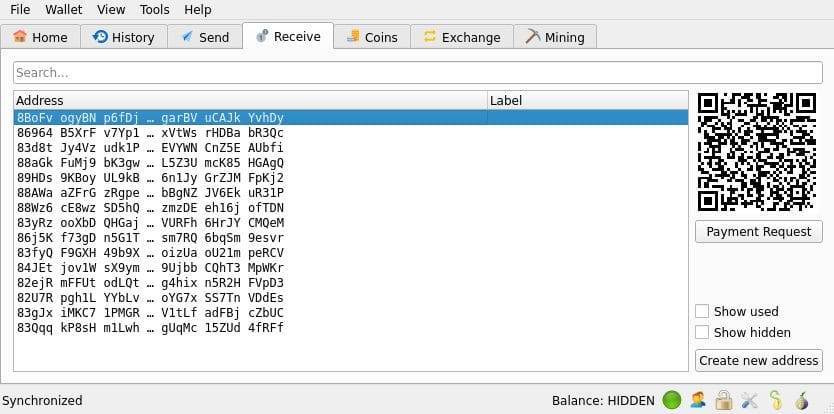
Feather wallet is a lightweight and user-friendly, open-source wallet for desktop. It too is endorsed by the Monero team on their official website.
Features
- Desktop app for Linux, Tail, Whonix, Prestium, Raspberry Pi, Windows, and Mac OS
- Language: English
- Dark mode and light mode
- Supports subaddresses
- Built-in TOR
- Both Ledger and Trezor enabled
- Non-custodial
- Monero (XMR) only
Pros
- Open-source means more people have had a chance to scrutinize the code which means the wallet is more trustworthy compared to others.
- Non-custodial. You know the saying: “not your keys, not your crypto”. Well in this case you own the keys.
- Users report it has a smoother user experience for desktop devices and is generally faster
- Easy to set up and install
- Easy for first-time users but also can do the same things the CLI wallet can do
- Multisig options which means you can add extra layers of security by requiring more than one person’s approval for transactions to go through.
- Uses subaddresses which means you don’t have to share your main address with anyone and can further protect your privacy.
- No registration or KYC is required which means you don’t need to provide any personal details such as an email address to set up your wallet.
- Has built-in Tor i.e. you do not need to install Tor separately. Tor, short for The Onion Router, is a network designed to anonymize internet traffic. It does this by routing data through a series of volunteer-operated servers (nodes) before reaching its destination. Each node in the network only knows the previous and next hop, making it difficult to trace the origin and destination of the data. This provides a high degree of privacy and anonymity for users.
- Ledger Nano S/S+/X and Trezor Model T compatible
Cons
- Only available in English. Their FAQs page indicates they plan to add more languages
- You can’t use P2Pool, the most popular 0% fee pool for Monero.
- Only supports Monero
- Not available on mobile
- Same issues with remote dependence i.e. there might be sync delays and you are vulnerable to connecting to malicious nodes that want to collect your IP.
Fees
- None apart from network fees for sending XMR.
Feather Resources
For a more detailed evaluation, check out: Feather Wallet for Monero: a Comprehensive Review
#6. Monero.com
Rating: 3/5
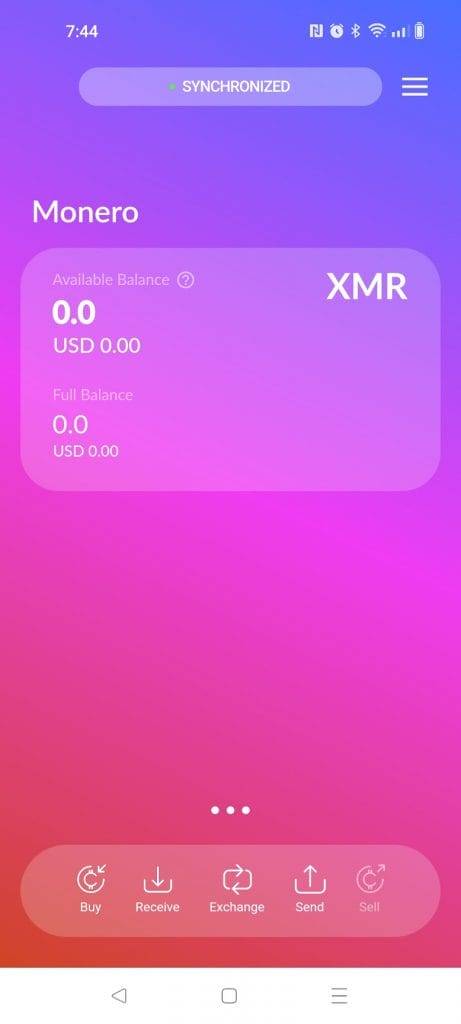
Monero.com was developed by Cake Labs, the same team that created Cake Wallet. It looks exactly the same as Cake Wallet except that it is dedicated to Monero only.
Backstory: The Monero.com wallet came about as a result of feedback from the Monero community that Cake Wallet should not support other cryptocurrencies. The community was especially successful in getting Cake Wallet to not include Zcash, Monero’s main competitor. Cake Wallet is a for-profit venture so when its founder @vicXMR saw that Monero.com was for sale he purchased it for $400K and set up a Monero-only version of Cake Wallet. Some people in the community feel this is contentious.
Features
- Mobile app available to download on Google Play Store and Apple App Store
- Multilingual support for 10 languages: English, Chinese, German, Portuguese, Spanish, Italian, Dutch, Japanese, Russian, French
Pros
- Exactly the same pros as Cake Wallet except that it does not support multiple currencies. However, you can still exchange XMR for other currencies. It’s just that other currencies are sent to the address of your choice in another wallet/exchange.
- Monero-only version of Cake for hardcore Monero fans
Cons
- Same cons as Cake Wallet in addition to the fact that you cannot have multiple cryptocurrencies on the same wallet
- Having the cake wallet and the Monero.com wallets is confusing to people
- The fact that Monero.com is an app wallet and not a web wallet is also confusing
Fees
- Like Cake, Monero.com is free to use unless you use the exchange in which case you will need to pay a small fee.
- The usual network fees for sending Monero
Remote synchronization Lightweight wallets
These types of wallets share your private view key with a remote server that continuously scans the blockchain for your transactions. The benefit of doing this is that your wallet syncs faster when you open it. The drawback is that the remote server can see your transactions even though it cannot control your wallet.
#7. Edge Wallet
Rating: 2.75/5
Formerly known as Airbitz, Edge is a mobile phone app wallet whose look and feel resembles a centralized exchange.
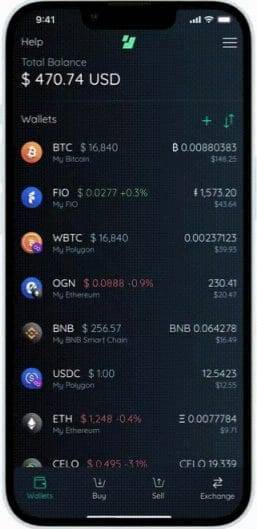
Features
- Available on both Apple and Android phones
- Languages: English. It says it supports 10 languages but I couldn’t find any other ones
- Partially open source
- Multi crypto
- Ability to buy crypto with fiat from within the app
- Fingerprint and password options with password recovery option
- Self custodial
- Support via tickets and phone
Pros
- Open Source: While the client-side code is open source, Edge Wallet uses a proprietary server infrastructure to provide some of its services. Users can verify the open-source client code for security and privacy reassurance.
- User-friendly interface and easy to set up
- It does not ask you to store a seed phrase. Instead, it asks for a password and username which can be used for recovery
- Security: Data is encrypted on your device and you have the option to set up 2-factor security.
- Supports thousands of coins across networks. Some popular ones are: Bitcoin (BTC), Avalanche (AVAX), Solana (SOL), Monero (XMR), Polkadto (DOT) Polygon (MATIC), Hedera (HBAR), Bitcoin Cash (BCH), Litecoin (LTC), Binance Coin (BNB), Tezos, Ethereum (ETH), Ripple (XRP), Binance Chain (BNB), RSK (RBTC), Stellar (XLM), Tezos (XTZ), Ravencoin (RVN), SmartCash (SMART), Zcoin (XZC), Dogecoin (DOGE), and Feathercoin (FTC).
- Option to use a FIO handle. A FIO handle is equivalent to an email address but for sending/receiving on crypto wallets.
- Plugin Support: Edge Wallet allows developers to create plugins that extend its functionality. This opens up the possibility for additional features and customizations.
- Integrates with third parties such as MoonPay and Bits of Gold so that you can purchase crypto with fiat
- Similarly, you can sell your crypto on Edge and cash out to your bank account
- Includes an exchange tab for you to swap between cryptocurrencies on different networks
- Includes a markets tab where you can track crypto coin tickers and prices
- Password Recovery: Users have the option to set up password recovery, allowing them to reset their password if forgotten.
- It’s fast
Cons
- Security and Usability Trade-Off: While using username and password recovery simplifies the process, it also introduces certain security trade-offs. The recovery mechanism may rely on a centralized server infrastructure, which can pose different risks compared to traditional seed-based recovery methods.
- Not available on desktop and neither as a Chrome extension which precludes you from participating in Web3
- Closed-Source Server Infrastructure: While the client-side code is open source, Edge Wallet relies on a closed-source server infrastructure for certain services. This may raise concerns about the transparency and security of the server-side operations.
- Centralized Account Recovery: While the account recovery process is user-friendly, it relies on a centralized authority (Edge’s server infrastructure). Some users may prefer decentralized recovery options that do not rely on third-party services. If their server goes down you have no wallet. So you are trading decentralization for speed
- Uses multiple partners and you may need to KYC with each before you are able to use their service e.g. to sell/buy crypto or onboard with fiat.
- I personally find their FAQ section hard to navigate.
- Keeps a copy of your view keys on Edge’s server. This allows them to see which coins are yours.
- Edge does not support hardware wallets which is where you should be storing any serious amounts of Monero
Fees
- Free to use other than network fees plus additional fees for using any of the built-in integrations
Resources
#8. Mymonero.com
Rating: 3/5
Mymonero offers a simple and accessible way for users to send, receive, and store Monero without the need to download and maintain a full Monero node.
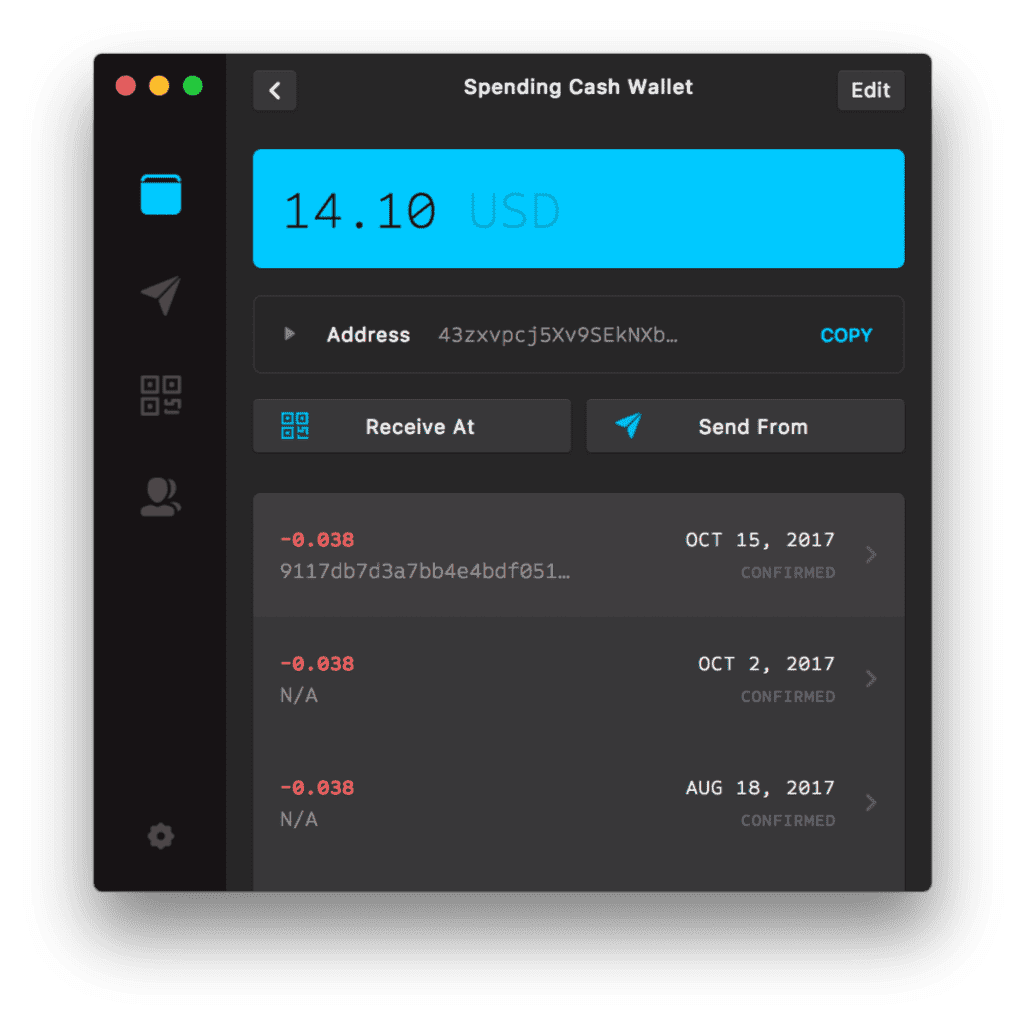
Features
- Available across devices: Android and iOS for mobile devices and Linux, windows, and Mac OS for desktop app
- Rolodex to keep addresses in order.
- Open Source
- 12 languages: English, Dutch, French, Spanish, Portuguese, Chinese, Japanese, Italian, German, Russian, Esperanto, Lojban
- Fiat onramps
- Inbuilt exchange for BTC with more currencies expected soon
Pros
- All the benefits of being open-source
- Faster than the other wallets mentioned so far. Since it doesn’t require users to download and maintain the full Monero blockchain, MyMonero is faster and more lightweight compared to full-node wallets and lightweight local-node wallets
- Easy to use: when I tested the desktop app it was easy and intuitive to navigate.
- Non custodial giving your full control of your private keys for transactions.
- Option to convert XMR to BTC using the ChangeNOW integration
- You can buy Monero using your credit or debit card directly from within the wallet app
Cons
- Google Play store glitch: When I tried to download the app to my Android device I got a message saying ” This app is not available for your device because it was made for an older version of Android”
- Doesn’t support sub-addresses which means you need to share your primary address to receive XMR which most Monero users don’t like sharing.
- Dependence on MyMonero’s Servers: MyMonero relies on its servers to access the Monero blockchain. This means you’re dependent on the availability and reliability of MyMonero’s infrastructure. There is also some contention within the Monero community about the implication sharing your view key. Some claim that this is effectively making your Monero wallet non-private.
- Not multi-currency (though Monero adherents think this is a good thing as it reduces complexity)
- No way to cash out directly to your bank account when you sell XMR
- Not hardware enabled which means you will need to use another cryptocurrency wallet if you plan on using a Trezor or Ledger device
Fees
- Free to store XMR
- Network fees to send XMR
- Additional fees for using the in-built exchange and fiat-to-crypto conversion.
Useful Resources
- mymonero.com official website
- Installation guide
- Privacy policy
- Mymonero web wallet
- Source code on GitHub
For a more comprehensive analysis see MyMonero wallet review.
Other wallets recommended by Monero users
Apart from the 8 wallets officially endorsed on getmonero.org here are some other wallets that my research shows Monero fans are using.
#9. Zelcore
Rating: 3/5
Zelcore is built by the same team that created the Flux Network. While the team has the necessary gravitas and expertise, the wallet seems to have been primarily designed for FluxNode miners.
Having said that, the wallet has evolved and is clearly aiming to become a one-stop shop for managing your crypto. I tested out the wallet after reading about it on the Monero subreddit.
Let’s take a closer look.
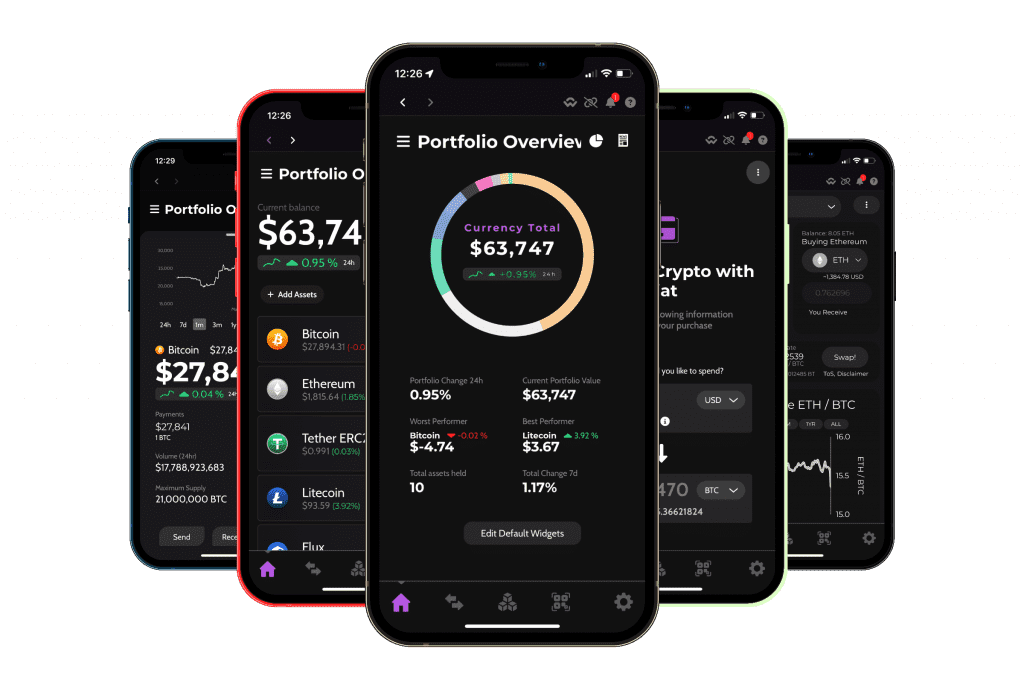
Features
- Available across devices: mobile and desktop apps and Chrome extension
- Muti-crypto support with250+ cryptocurrencies
- Ledger and Trezor enabled
- NFT Gallery
- Swap exchange
- Fiat onboarding
- Non-custodial
- 16 languages: English, Czech, Danish, German, Spanish, French, Italian, Norwegian, Polish, Portuguese, Serbian, Finnish, Swedish, Turkish, Greek, Russian,
Pros
- Multi-asset platform supporting more than 250 coins and 50,000 tokens. Includes option to import tokens via contract address.
- Non-custodial wallet with private keys encrypted directly on device.
- Easy sign up process that only requires a username and password. No seed phrase provided.
- Integrates with multiple exchanges such as QuiskSwap and Binance DEX. In addition you have the option to use a centralized exchange such as Kraken, Binance, Gemini, Kucoin, Gate.io, Coinbase. Some of these are provided to premium subscribers only.
- You can buy crypto directly through the app using third party integrations such as MoonPay .
- Option to se up decentralized two-factor authentication i.e. a pin that is stored on the Flux Network. Additional options to set up fingerprint and Face ID
- The wallet’s NFT Gallery (currently in beta) is cross chain which means you can import all your NFTs to one place.
- Ledger and Trezor enabled (expected soon)
- For advanced users there is a feature for node operators to manage their FluxNodes.
Cons
- The biggest red flag is that you private keys are derived from the password and username you have set. I see many people on Reddit complaining that their log in details were stolen by scammers who were posing as helpful community members and sent them to the wrong page on Discord. Make sure you use a strong password and don’t fall for scammers if you decide to use Zelcore.
- The user interface feels as if it has been put together hastily without much thought to design aesthetics. While the wallet is functional its not great to look at.
- Support and FAQ pages are sparse and there is no support
- No about us page on the home page which makes me concerned about their transparency
- No transaction history or csv export for calculating crypto gains for tax purposes.
- Closed-source code which means more experienced technical people in the Monero community can’t check the code for backdoors and other issues.
- No Web3 browser integration. For a wallet that wants to be the go-to place to manage your crypto, this is paramount. However they do have a Chrome browser extension which you can use to connect your wallet to DeFi and gaming platforms directly.
Fees
I couldn’t find their fee structure anywhere. You can expect to pay blockchain network transaction fees plus additional fees that their partners charge for trading crypto and fiat onramps/offramps. Zelcore users who are willing to pay $4/month get access to the platform’s premium services called Zelcore+. Most of the benefits offered in exchange for the premium subscription went over my head but they have and article describing them.
Resources
- Official site
- Support pages
- The wallet setup guide is available here.
Check out the complete Zelcore wallet review for more in depth details and how to use it.
#10. XMRWallet
Rating: 2/5
While preparing this review I played around with XMR Wallet available at XMRWallet.com. The wallet is pretty good if you are looking for a no-frills web-based wallet for storing Monero on. Developed by by Nathalie Roy in 2014, XMRWallet is open source web that is well respected within the Monero community.
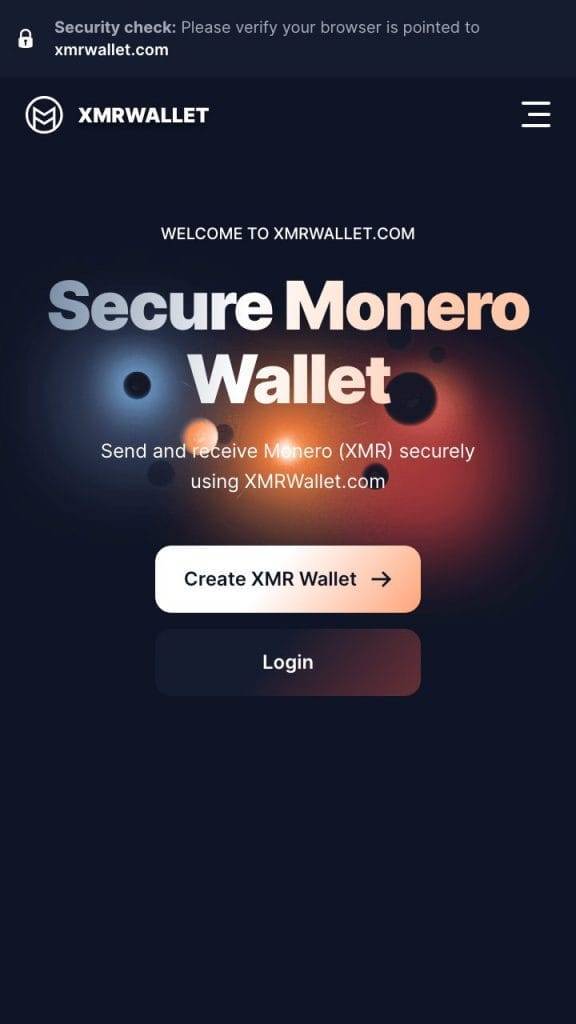
Features
- Web wallet only i.e. not Mobile or desktop app available and no browser extension.
- For sending, receiving and storing XMR only
- Available in 12 languages: Lojban, Esperanto, Spanish, German, French, Italian, Dutch, Chinese Simplified, Russian, Portuguese, Japanese
- Open source
- Free to use
- TOR addresses available
Pros
- Source code is available to the public on Github. The 9 years it has been around mean that many people have had a long time to scrutinize the code and check for vulnerabilities.
- Free to use. XMRWallet does not charge transaction fees so the only fees you will be paying are the network fees for your transactions to go through
- Does not require registration and does not collect any personal information
- Private keys are stored locally on your device. This means no one else is able to see it or use it.
- The no frills user interface makes it extremely easy to use.
- The wallet preserves your privacy and does not collect analytics or other behavioral data.
- TOR compatible which means you can browse the wallet on the dark web in order to ensure 100% privacy.
Cons
- Lack of support for other currencies. If you are looking for a wallet where you can manage everything in one place consider some of the other wallets listed here such as Cake, Exodus or Zelcore
- Uses a remote note which exposes it to potentially malicious notes that try to collect your IP
- The only way to log in is with your seed phrase and if you have indeed written it down on a paper as you are supposed to this can be frustrating and time-consuming to do every time.
- XMRWallet is not available as an app or browser extension which some users might prefer
- The wallet does not include a way to purchase XMR with fiat or to cash out your XMR. To do that you either have to use a different wallet or an exchange.
- Finally, XMR Wallet is unfortunately not compatible with hardware wallets.
Fees
None, apart from the blockchain transaction fees that you need to account for when sending or receiving XMR.
Useful Resources
For a comprehensive review of XMR Wallet see here.
#11. Exodus
Rating: 4.25/5
Out of all the wallets I use Exodus has made a significant impression on me.
It’s available across devices and as a browser extension which none of the other Monero wallets offer.
It has an intuitive design and does not fluster you with all the possible security settings you may want to set which you can later adjust under settings.
Its biggest plus point is that it can handle all cryptocurrencies and integrates well with Web3 either via the app’s Web3 browser or the Chrome and Brave browser extensions.

Features
- Available in all possible formats: mobile device app, desktop app and web extension
- Supports English and Spanish (beta)
- More than 300 currencies to store and trade
- Includes swap exchange
- Web3 browser that allows you to plug straight into DeFi like lending staking etc.
Pros
- Sleek design and user friendly interface
- Option to customize widget layout
- Ability to add personal notes to transactions
- Has an toggle setting where you can increase your bid on certain blockchains for your transaction to go through faster
- Securely stores and encrypts your private keys on your device. Additional setting allow you to set a password and fingerprint identification.
- Supports 364 crypto coins and tokens and includes the ability to import coins that are not already included
- Doesn’t require KYC
- Non-custodial
- Portfolio tab can be customized to show separate wallets or to group certain transaction together
- Contains an NFT gallery. You can import any NFT no matter the network and store and view it in your gallery
- Exodus is a publicly traded company that files quarterly reports which are available on their website.
- Built in exchange that partners with third party exchanges so you can swap one crypto from another. They do not mention who their partners are.
- Fiat onboarding capabilities via third party integration with MoonPay
- Built in Web3 browser: This allows you to participate in DeFi activities such as borrowing, lending and staking your tokens.
- Trezor hardware wallet enabled
- 24/7 live chat customer support and rich central resource hub
Cons
- Unlike the other wallets Exodus is not open source.
- They do not disclose which exchange or exchanges they partner with.
- They do not disclose their own fees for buying and selling crypto
- On their exchange you cannot adjust slippage like you can with a decentralized exchange and you can’t set stop order or limit orders like you can with a centralized exchange
- While the sign up process is really fast new users might not be aware that they need to upgrade their security settings by setting a password, fingerprint ID and writing down their seed phrase
- They do not offer two factor authentication
- If you study their privacy policy you will see Exodus does collect some personal info such as cookies and IP addresses.
- Personally as a former UX consultant I do not like that they do not have titles for their bottom menu. This makes it less intuitive.

Fees
- Blockchain transaction fees for sending, trading and receiving crypto
- Surcharges for using their third-party integrations with fiat-to-crypto and crypto-to-crypto purchases. Exodus does not disclose its fees.
- You will also need to account for fees paid to any of the third party integrations for using their services
- There are no fees for using and storing crypto on Exodus
Resources
See here for a full Exodus wallet review
#12. Guarda
Rating: 3.5/5
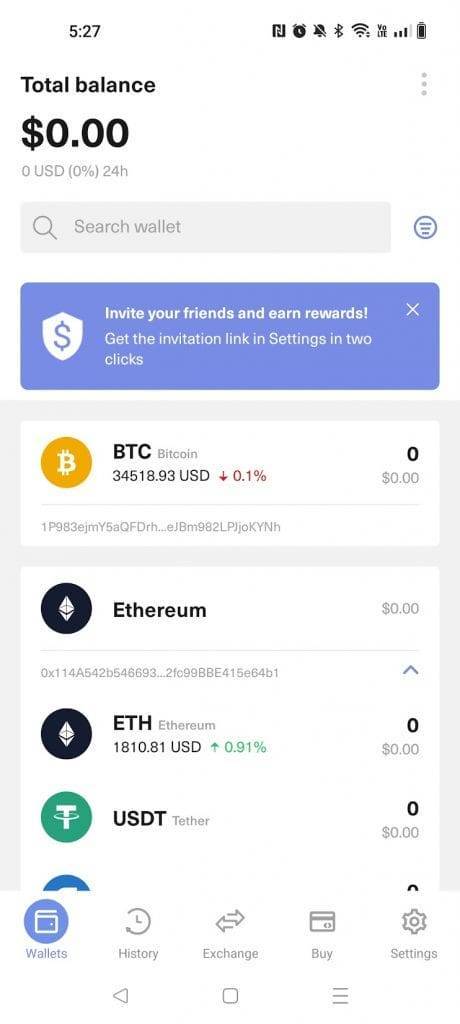
Guarda stands out as a non-custodial wallet that looks and feels like a centralized crypto exchange.
The wallet accommodates multiple cryptocurrencies across chains, boasts an integrated exchange, simplifies staking, and extends its offerings to include a prepaid visa card, lending services, and even an option for users to create their own ERC-20 tokens.
However, it’s worth noting that Guarda comes with a higher cost compared to some alternatives, and a subset of users have reported experiencing user experience glitches—something which I also observed during my own evaluation of the app.
Features
- Available across devices: iOS, Android mobile app and Desktop application for Windows, Linux, Mac OS, Web wallet and Chrome browser extension
- Languages: English only
- Multiple cryptocurrencies
- Built-in exchange
- In-built crypto staking feature
- Option to take a loan using your crypto as collateral
- Prepaid visa card (new)
- Multisig
- Token generator
- Fiat to crypto conversion
Pros
- Built-In Exchange Service: Partners with third-party exchanges like ChangeNOW and Swapzone, allowing users to easily swap one crypto for another.
- Staking: Features a staking option, enabling users to earn rewards by locking up their cryptocurrencies.
- Crypto Loans: Allows users to use their crypto as collateral for loans through a partnership with CoinRabbit, providing quick and KYC-free lending.
- Prepaid Visa Card: Recently introduced a prepaid Visa card, offering users the ability to spend their crypto with ease.
- Multisig Options: Enables the creation of multi-signature wallets for added security.
- Create ERC-20 Tokens: Includes a token generator for minting personalized ERC-20 tokens, a feature I didn’t come across in any other wallet.
- Ledger Enabled: Compatible with Ledger Nano S hardware wallets, ensuring a secure long-term storage option for large amounts of crypto.
Cons
- Not Completely Open-Source: Some parts of Guarda’s code are not open-source, which may concern users who prefer full transparency.
- UX Concerns: While user-friendly, there are reported glitches and missing features, such as the inability to add comments to transactions or display coin prices at the time of purchase.
- No Web3 Browser: Lacks an integrated web3 browser tab, limiting direct interaction with decentralized finance (DeFi) apps within the wallet.
- Hefty Fees: Guarda charges relatively high fees for services such as staking, crypto loans, and prepaid card transactions.
- Security: While private keys are encrypted on the device, storing a digital copy of the wallet backup may pose security risks.
- Limited Information on Guarda Team: The lack of detailed information about the Guarda team raises transparency concerns.
- Collects Personal Information: Guarda collects some personal data, including IP addresses and URL clickstreams, as stated in their privacy policy.
Fees
- Exchange fees: Guarda partners with 3rd party exchange aggregators. You will have to account for fees paid to these platforms as well as any network fees for sending /receiving crypto
- Send/receive crypto: You don’t get charged for sending or receiving crypto but you do need to account for network fees to blockchains. These transaction fees are usually not substantial but can become when specific blockchains are clogged with demand.
- Loan fees: 12-17% APR. Compare this to a platform such as Compound.Finance which charges 2.16% for USDC at the time of writing and you will see that Guarda’s fees are exorbitant.
- Prepaid Visa Card:1.5% to top up and 2.5% to convert crypto to fiat currencies. Again these are on the higher side compared to say Binance who hardly charge you anything.
Resources
For a comprehensive evaluation see my Guarda wallet review here.
#13. Stack Wallet
Rating: 2.75/5
When I downloaded and tested Stack Wallet it was a positive experience overall. The wallet was easy to set up and intuitive to navigate.
Stack is an open-source wallet cross-device wallet that supports multiple cryptocurrencies and features a crypto exchange tab and fiat-to-crypto conversion. Its drawback is that it is relatively new and does not support hardware wallets.
Features
- Open source
- Cross-device
- Non-custodial
- Multicurrency wallet
- Built-in exchange
- Backup restoration for your password
- Address book
- User-friendly with a feature to save your favorite wallets
- Advanced options include choosing your own node, testnet support, post technology, smart sync
- Languages: English only
Pros
- Self-Custody: Non-custodial wallet, ensuring that private keys are stored only on the user’s device for enhanced security.
- Easy to Use: User-friendly features, including built-in exchange, fiat onboarding, and wallet recovery, making it highly intuitive.
- Easy Backup: Offers both auto and manual backup options with passphrase encryption, providing users flexibility and control over their wallet backups.
- Tor Enabled: Utilizes Tor to hide IP addresses, enhancing user privacy and making it challenging for third parties to identify real-world identities.
- Multi Crypto: Supports a diverse range of cryptocurrencies and tokens, allowing users to set up separate wallets for different digital assets.
- Built-in Exchange: Partners with third-party exchange providers, displaying the best rates and comparing them with other exchanges.
- Fiat to Crypto Onboarding: Integrated with payment provider Simplex for direct purchase of crypto within the wallet interface.
- Node Customization: Allows advanced users to change the connected node for more personalized preferences.
- Support: Provides various support channels, including Telegram, Discord, Reddit, Twitter, and email.
- Custom Address Book: Enables users to add wallet addresses with contact names and emoji profile pics, customizing the address book.
Cons
- Not Compatible with Hardware Wallets: Incompatible with hardware wallets like Ledger Nano or Trezor, which are considered safer for storing large amounts of crypto.
- Security: Vulnerable to unauthorized access if someone gains access to the passphrase or backup passphrase, highlighting potential security risks.
- Relatively New: Being relatively new, the open-source nature may not have undergone extensive scrutiny for vulnerabilities.
Stack Fees
- Stack charges 0% fees for storing sending or receiving crypto. However, you do need to account for blockchain fees when you transact with them like you do with all wallets.
- When you trade on their exchange you will need to account for the fees paid to the exchange plus any commission that Stack gets here. They do not disclose their fees on their site.
Resources
Check out the comprehensive Stack Wallet review for more.
#14. Elite Wallet
Rating: 2.75/5
Elite is a fork of Cake Wallet. Its developers’ main motivation in creating it was to make a wallet that is 100% transparent about privacy and does not collect any personal data which they imply Cake Wallet does.
From a user perspective, the wallet is easy to use but it has a limited selection of cryptocurrencies, no hardware support, and no way to buy crypto with fiat.
Bottom line: nice privacy-preserving wallet but not sure why I should use it as opposed to well-established wallets such as Monerujo, Feather, MyMonero, Cake Wallet, and Monero GUI wallet.
Features
- Available on Android and iOS. Desktop app coming soon
- Open source
- Supports multiple cryptocurrencies
- Built-in exchange
- Option to connect via proxy
- Tor enabled
- Customizable fees
- Privacy-focused without backdoors
- 28 languages: English, Chinese, German, Portuguese, Spanish, Italian, Dutch, Japanese, Russian, French, Hindi, Korean, Dutch, Polish, Portuguese, Ukrainian, Croatian, Italian, Thai, Arabic, Turkish, Burmese, Bulgarian, Czech, Urdu, Indonesian, Yoruba, Hausa (Nigeria)
- Includes address book to store your contacts
Pros
- Connects to Remote Node: Syncs with the blockchain by connecting to trusted community nodes, offering customization options for advanced users.
- Security: Encrypts private keys directly on the device, eliminating concerns about centralized server storage. Utilizes proxies to conceal IP addresses, enhancing user privacy.
- Supports Multiple Coins: Currently supports Monero (XMR), Bitcoin (BTC) via Electrum, Litecoin (LTC) via Electrum, Haven (XHV), and Wownero (WOW).
- Monero Subaddresses: Allows the use of Monero subaddresses, providing an additional layer of privacy when receiving XMR.
- Built-in Exchange: Partners with Majestic Bank and Xchange.me for cryptocurrency trading. Offers the flexibility to convert to multiple currencies without requiring KYC.
- Backup Options: Provides the option to create a backup password, enabling the import of backup files in case of seed phrase loss.
- Open Source: Completely open-source, allowing transparency and scrutiny of the source code for potential weaknesses. Emphasizes the absence of hidden API keys in the code.
Cons
- Not compatible with hardware wallets: Incompatible with hardware wallets like Ledger Nano S, Trezor Model T, or Coolwallet Pro, which may be a concern for those holding a significant amount of crypto.
- No Web3 integrations: Lacks certain features such as an NFT gallery and a web3 browser, limiting participation in DeFi activities.
- Limited number of coins: While supporting additional coins beyond Monero, some users may desire a broader range of cryptocurrencies and tokens.
- No fiat onramps/offramps: Requires users to buy crypto with fiat on external exchanges before transferring it to the wallet. Unlike some competitors, Elite does not facilitate direct fiat transfers within the wallet interface.
Fees
- Elite does not charge fees for sending, storing, or receiving crypto.
- Transaction fees are incurred on the respective blockchain to reward miners.
- A small service fee may apply when using the built-in exchange.
- Additional fees may be associated with third-party integrations within the wallet.
Resources
See here for a more detailed review of Elite Wallet.
#15. Freewallet
Rating: 3/5
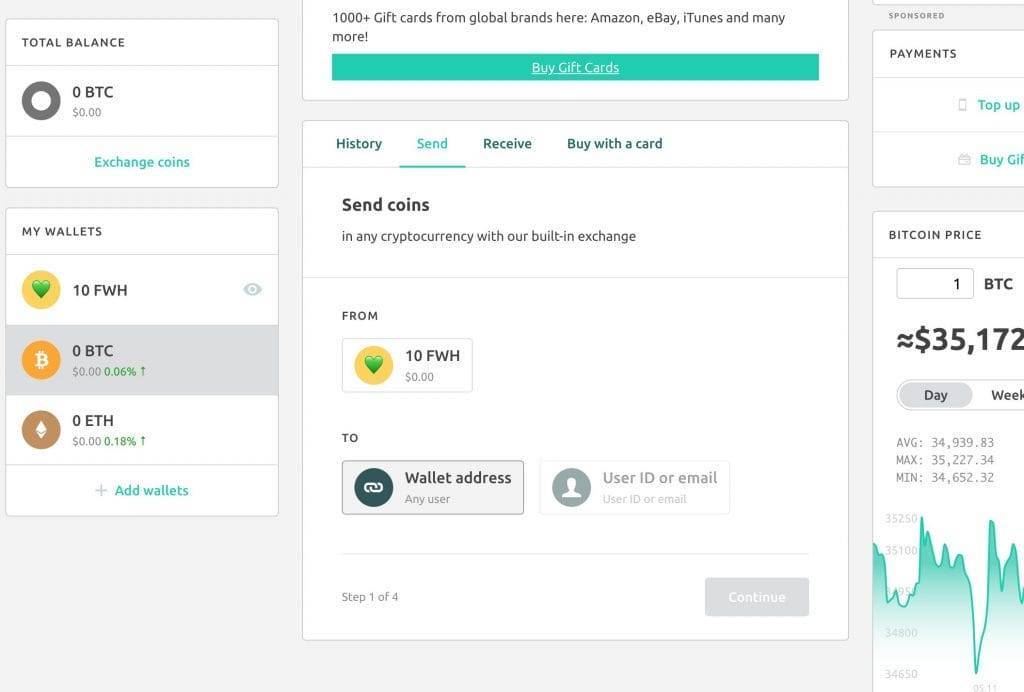
Freewallet is a custodial wallet and this is the key feature. The main draw is its simplicity, allowing users to store crypto using just an email address without the need for seed phrases. However, concerns arise within the crypto community due to its closed-source nature and custodial control over private keys
Freewallet is available both as a mobile app and a web-based wallet. The platform offers multiple cryptos, and fiat onramps through third parties like Simplex and features an integrated crypto exchange. Notably, it caters to US users with additional features such as the ability to purchase gift cards and top-up prepaid phone cards.
Bottom line: use Freewallet for small amounts for its convenience but don’t store any significant amount of crypto on it.
Features
- Available on Web browsers and iOS and Android apps
- Fiat to crypto onboarding
- Multi-currency
- Features to set withdrawal limits
- Cold storage security
- 7 Languages: English, Chinese, German, French, Bahasa Indonesia, Korean, Japanese
- Additional security: Two-factor authentication, fingerprint, and PIN code
- Free crypto transfers between Freewallet users
Pros
- Ease of Use & Custodial Service: The account setup doesn’t require a seed phrase, resembling a Web2 registration process. Recovery is facilitated through email and managed by Freewallet on their server.
- Free Transfers Between Users: Utilizes a sidechain for fee-free transfers among Freewallet users.
- Built-in Exchange: Partners with third parties for seamless cryptocurrency swaps within the wallet.
- Multi-Currency Wallet: Supports 150+ cryptocurrencies, allowing separate wallets for each.
- Custom Security Features: PIN codes, biometric authentication, 2FA, and additional security settings. Email confirmation with delayed transactions and multi-approval options.
- User-Friendly: Interface reminiscent of a Web2 app, displaying total balance and essential functions.
- E-commerce Features: US-focused, enabling gift card purchases (Amazon, Apple, Uber Eats) and phone card top-ups.
- Customer Support: Support via tickets and FAQ page.
- Fiat to Crypto: Partnerships with Simplex and Moonpay for direct debit/credit card crypto purchases.
Cons
- Custodial Control. In crypto forums, some hardliners are calling Freewallet a scam due to its custodial nature, akin to centralized exchanges. They cite concerns about potential loss of access if server-related issues occur.
- Closed Source: Lack of transparency hinders independent verification of security and key protection.
- Limited Anonymity: Falls short on providing the same level of anonymity as fully decentralized wallets.
- Not Available on the Latest Android Version: When I checked I was unable to download the app on my Android device. The website directs users to a third-party site to download it.
- User Reviews Report Bad Experiences: Some users reported negative experiences and customer service issues. Despite concerns, the site maintains a 4-star rating from 107 reviewers on Sitejabber.
- Not compatible with Hardware wallets.
- Not Web3 Enabled: Lacks functionality for Web3 and DeFi participation, including staking, borrowing, lending, yield farming, and Web3 gaming.
Fees
- Ironically Freewallet is not a free wallet and has a $10 monthly subscription fee after 13 months
- Undisclosed surcharges when you use their in-built exchange or withdraw crypto
Resources
- Official Website: Freewallet
- Support and FAQ
- Privacy policy
Check out the Freewallet review on ElementalCrypto for a more detailed assessment.
#16. Coinpayments
Rating: 2.75/5
Coinpayments is a crypto payment wallet aimed at merchants. However, it can also be used as a personal wallet and I did come across some users recommending it on the official subreddit of Monero.
Bottom line: Use for personal use if you want a custodial wallet and are not too fussy about the UX. Store owners will find it’s a good wallet to process payments.
Features
- Available on iOS and Android devices as well as a web version
- Payment Processing in multiple cryptocurrencies
- Plugin integrations for popular e-commerce platforms and their shopping carts
- Auto coin conversion
- POS solutions that allow businesses to accept crypto payments in brick-and-mortar stores
- Vault service for enhanced security with transaction limits
- Multi-Coin Wallet
- Merchant Tools such as APIs, donation buttons, and customizable payment buttons.
- Password and two-factor authentication
- Customer service: you can open a support ticket or use the Support wizard
- 14 Languages: Arabic, Chinese, English, French, German, Hindi, Hungarian, Italian, Japanese, Korean, Portuguese, Spanish, Thai, Ukrainian
Pros:
- Diverse Cryptocurrency Support: Over 2,350 supported cryptocurrencies, including Bitcoin, Ethereum, Litecoin, and more.
- Payment Processing Integration: Seamless integration with popular e-commerce platforms for accepting cryptocurrency payments.
- Conversion Services: Built-in conversion services to mitigate cryptocurrency volatility.
- Point of Sale (POS) Solutions: POS solutions for physical businesses to accept cryptocurrency payments.
- User-friendly interface for beginners and experienced users.
- APIs and Customization: APIs and customizable payment buttons for a tailored payment experience.
- Fiat to Crypto: Accepts debit and credit cards for buying crypto with fiat currency.
- Hardware Wallet Compatible: Compatibility with Trezor devices for enhanced security of large crypto holdings.
- Built-in Exchange: Partnerships with third-party exchanges like ShapeShift.ai for convenient crypto conversion.
- Vault: Timebound transaction limits for added security. Alerts for potential unauthorized transactions.
- Multisig: Option to create a multi-signature wallet for transactions requiring multiple approvals.
Cons
- Fees: Competitive for payment processing but less favorable for personal use.
- Custodial: Operates as a custodial wallet, holding private keys and managing cryptocurrency funds.
- Lack of Privacy: Requires KYC process, including email and ID verification.
- Poor Ratings: Received poor ratings on Google Play Store and Trustpilot. Complaints about the verification process, app glitches, and high fees.
- Annoying Mobile Sign-in: Initial login requires desktop interaction and scanning a QR code. Subsequent logins can use PIN or biometric authentication.
- Basic UI: The user interface appears outdated and lacks wallet setup options.
- The wallet’s closed-source nature raises transparency and trust concerns for some.
- Experienced a hacking incident on June 5th, 2017, exposing a glitch in XRP withdrawals from Ripple hot wallets
Coinpayments fees
- Business owners: 0.5% for incoming payments which is low for the industry
- Personal use: free up to $15,000 incoming crypto per month after which you will be charged 0.5%.
- Also, consider exchange fees to the third-party exchanges that Coinpayments integrates with as well as network fees to the blockchains.
- No fees for withdrawals apart from the network fee.
Useful Resources
Also see: Coinpayments Wallet Review: Best Guide for Pros & Cons
#17. Rino Wallet
Rating: 1.25/5
Rino is an enterprise-focused Monero wallet. It includes multiple signatories, and approver roles, among other features. The wallet also includes a free community version for individual holders of XMR and I have seen it mentioned a couple of types on the Monero subreddit which is why I decided to look into it
Features
- Devices: Web-based wallet
- Non-custodial meaning only you can see the keys to your wallet
- Real-time availability: the wallet syncs in the background
- Multi-device syncing for those that use more than one device.
- Multisig support in case you want to have more than one person approving transactions
- Two-factor authentication
Pros
- Spending limits so that a given signatory cannot spend more than the funds allocated.
- Built-in Exchange so that you can swap your XMR coin with more than 100 other coins while within the wallet.
- Wallet sharing – like an enterprise bank account, authorized signatories can view transactions on the wallet.
- Approver roles allow you to determine what each signatory can do with the wallet.
- Password protection: the multisig and 2FA features mean that your wallet is not compromised even if someone steals your password.
Cons
- Not transparent on fees. I could not find what they charge for their service anywhere on their site
- Targeted at enterprise users which means that you get the most benefit out of this wallet if you are an enterprise customer and not an individual user.
Fees
- The community version is free to use
- The enterprise edition is free for one year
Resources
- Official website
- FAQs
- Detailed deep dive here.
#18. Atomic wallet
Rating: 2.5/5
Atomic Wallet is a popular wallet that boasts some cool features including multi-cryptocurrency support, an inbuilt exchange, atomic swap, and fiat on-ramps. Its sleek design made it an attractive wallet to me at some point. Its major drawback is that it got hacked and that the founder has been in jail for being involved in the Silk Road an illicit marketplace that used cryptocurrencies for payments in the early days of crypto.
Features
- Available across devices: desktop wallet on Windows and Linux platforms and Android or iOS app
- 9 languages: English, Spanish, Russian, Dutch, German, French, Turkish, Italian, Portuguese
- Option to stake your crypto directly from within the wallet.
- Offers atomic swap exchange a mechanism that uses a smart contract technology to exchange one cryptocurrency for another directly between two parties.
- Includes Built-in exchange
- Third-party integrations with providers such as Changelly, SimpleSwap, and ShapeShift facilitate the swapping of coins that can’t be done via atomic swaps.
- Has its own token, the Atomic Wallet Coin (AWC) that facilitates exchange transactions on the wallet.
- NFT gallery
Pros
- Non-custodial wallet with private keys encrypted on users’ devices.
- Option to buy crypto with fiat purchases directly with a credit or debit card
- The wallet is easy to use and has an aesthetic design making it easy to navigate.
- Friendly customer support – Most Atomic Wallet reviews allude to the customer support staff and the technical support team as being friendly in handling customers’ issues.
- The staking mechanism enables token holders on the Atomic Wallet to earn passive income directly from within the app without having to use third parties.
Cons
- In June 2023, the wallet lost about $100 million in an exploit that affected 5,500 of their accounts. To date, it is not clear what exactly happened.
- Closed source – being closed source limits auditing by independent parties. Unlike open-source wallets, this makes it harder to detect and weed out potential security vulnerabilities. Nonetheless, the Atomic Wallet team has indicated that they are in the process of making the wallet code open-source.
- No integration with hardware wallets which means you have to use an alternative wallet if you plan on using a cold storage wallet.
Fees
Atomic Wallet is free to use. You only pay for transaction fees incurred on ancillary services provided by the wallet such as atomic swapping, third-party swapping, and in-wallet purchases. Plus you need to account for transaction fees
Resources
- Official website
- Comprehensive Atomic Wallet review
Monero Hardware wallets
#19. Ledger
Rating: 4.625/5
The Ledger Hardware Wallet is the Luis Vuitton of crypto wallets. They even hired the marketing guy from LVMH. Ledger is considered one of the most secure wallets for storing large amounts of crypto because it is not connected to the internet. The devices resemble USBs and encrypt your private keys directly into the wallet. Ledger has recently come under criticism after they announced a new service called Ledger Recover that allows you to recover your keys.
Bottom Line: Ledger is by far the best hardware wallet I have come across. Its custom OS, secure chip, and on-device encryption make it one of the most secure hardware crypto wallets out there. The launch of the optional Recover feature increases my likelihood to purchase the device as it makes it idiot proof and I frequently misplace or lose stuff. If you are looking for a wallet for maximum security then Ledger is your best option. Some of the drawbacks are that it is not the best wallet for mining and not the best for participating in DeFi.

Features
- Compatible across devices: desktop Windows, MacOS, Ubuntu and Android, and iOS on mobile
- 11 languages: English, Arabic, Chinese, French, German, Russian, Spanish, Japanese, Korean, Turkish, Portuguese
- USB-C cable and Bluetooth connectivity for the Nano X and Stax
- NFT Storage ( on Polygon and Ethereum)
- Secure Element Technology: Incorporates a secure element chip for enhanced protection against attacks.
- Multi-Currency Support: Supports over 5,500 cryptocurrencies including Bitcoin, Ethereum, and Monero.
- User-Friendly Interface: Intuitive interface for easy navigation and management of crypto holdings.
- PIN Code and Backup Recovery: Utilizes PIN codes for device access and provides backup recovery phrases for account restoration.
- Ledger Live App: The companion app, Ledger Live, offers staking, fiat to crypto, and crypto to crypto exchange.
Pros
- High Security Standards: Utilizes state-of-the-art security measures, including secure element technology and BOLOS OS both of which make it extremely hard to tamper with the device. Moreover, the device is not connected to the internet which makes it very secure. Whenever you do connect to the internet via the app you need to physically confirm transactions by pressing buttons on the device.
- Versatile Cryptocurrency Support: Extensive support for various cryptocurrencies, catering to diverse user preferences.
- User-Friendly Design: The intuitive interface and Ledger Live app enhance the user experience.
- Recovery Options: For those who want this feature Ledger will cut your seed phrase in 3 and store each shard with separate cold storage providers. You need to KYC for this option and pay a monthly subscription fee but at least you have peace of mind for being able to restore your wallet should you lose your device or seed phrase.
- Has a companion app called Ledger Live that allows you to trade cryptocurrencies via the integrated exchange and offers Web3 features such as staking.
Cons
- Initial Setup Complexity: Some users report the setup process to be slightly complex (it isn’t though).
- Cost Consideration: You do have to purchase the wallet as opposed to using a free software wallet.
- The Ledger recovery feature was launched without an announcement and many people were upset that there is an API in the devices that can theoretically be used to retrieve the seed phrase.
- No 100% open source: the Ledger wallet is open source to a large extent however some parts of it such as the secure element cannot ever be open source because they are provided by a third party.
- Not great for DeFi: while the Ledger Live app has integrated a web3 tab that offers some DeFi options such as staking it’s not fully there yet. You would need a software wallet if you wanted to go fully degen.
- The Ledger Live app does not support Monero so you need to combine Ledger with one of the following wallets: Monero GUI, Guarda, Zelcore, Monerujo, or Feather.
Fees
- Ledger Nano S Plus: $79-82
- Ledger Nano X: $149-155
- Ledger Stax: $279
- Ledger Recover: $10 per month should you choose to use it.
I have a more comprehensive review of Ledger that looks into whether it is still safe to use and examines each of the models in more detail.
#20. Trezor
Rating: 4.125/5
Trezor is an industry leader when it comes to hardware wallets. Together with Ledger, the two companies have cornered the market for hardware wallets. Trezor was developed by SatoshiLabs, a privately owned company founded in the Czech Republic in 2013. They offer three models: The Trezor One, The Trezor Model T, and the Trezor Safe 3. Up until recently, their major weakness was that they did not use a Secure Element but this has changed with the TS3 which uses one. Another area where Trezor differs from Ledger is the recovery process. Trezor does not offer a centralized recovery solution. It does however offer Shamir backups. This is a way to break up your seed phrase into multiple shards. However, you are responsible for distributing the to friends you trust rather than Trezor taking care of this for you.
Features
- Compatible with both Android and iOS devices and desktop
- 4 Languages: English, Spanish, Czech, Russian
- Live chat customer support.
- Accompanied by the Trezor Suite app but is compatible with other software wallets as well.
- Multi-crypto support for over 8,000 coins and tokens including Bitcoin, Monero, Ethereum, and all ERC-20 tokens.
- Tor enabled to protect your privacy
- Standard backup and Shamir backups
- Coinjoin privacy: an optional feature that protects your privacy because it obscures the origin and destination of your Bitcoin transactions.
Pros
- Open source
- Easy-to-use interface on both the app and the device
- Security features such as PIN and Password device protection for an extra layer of security
- Packaging comes with security seals so you know if anyone has tried to tamper with your device
- Trezor devices can double up as offline two-factor authenticators. These are considered more secure than apps like Google Authenticator.
- Recovery options. You can always recover your device to another wallet using the 12-word seed phrase or if you like you can set up and distribute multiple shards to friends and family.
Cons
- When I looked at the review it scored very well on Amazon. Those who were unhappy complain about the lack of empathetic support and glitches with the wallet not working. Some users also report that the product feels somewhat flimsy.
- Depth of cryptocurrencies: some big ones are not available to store such as Solana, TRON, Cosmos, Polkadot, Filecoin, Algorand, and Bitcoin SV.
- You need to buy it
Fees
- Trezor One: $69. This is the original model but it supports fewer cryptos.
- Trezor Model T: $219 (it has a touchscreen)
- Trezor Safe 3: $79
Resources
See here for a more comprehensive examination of Trezor.
A word about exchange wallets
When researching the best Monero wallets I came across many sites with affiliate listings that proposed storing your Monero on an exchange.
Please be aware that these sites receive an affiliate commission for getting you to sign up for the exchange. They list this clearly in their disclaimers if you pay attention.
However, there are a few things you should know before you store your Monero on an exchange
1. Not all exchanges accept Monero.
For example, Coinbase does not support XMR at the time of writing
2. To deposit or buy crypto on an exchange you need to KYC.
If you use Monero because you care about anonymity then be aware that you are not at all anonymous if you use an exchange to store your XMR on it. See also Buying Monero: Best Guide on How to Buy XMR Privately
3. When you store your XMR on an exchange you are storing it in a custodial wallet.
This is convenient because you don’t need to write down any seed phrases and you can recover your password. However, there are two problems with this:
- If the exchange goes bust you can wave goodbye to your Monero. It’s not like with a bank where the FDIC will insure your funds. This is what happened to users who stored their assets on exchanges like Mt Gox, FTX, Quadriga, and more.
- While most exchanges store the majority of their funds in cold storage, exchanges are a central point of failure. If anyone hijacks your phone and gets your password they could steal your funds. If you are hell-bent on using an exchange use one that allows you to set time limits on withdrawals. Check out Kraken and Coinbase vaults for more.
Types of Monero Wallets
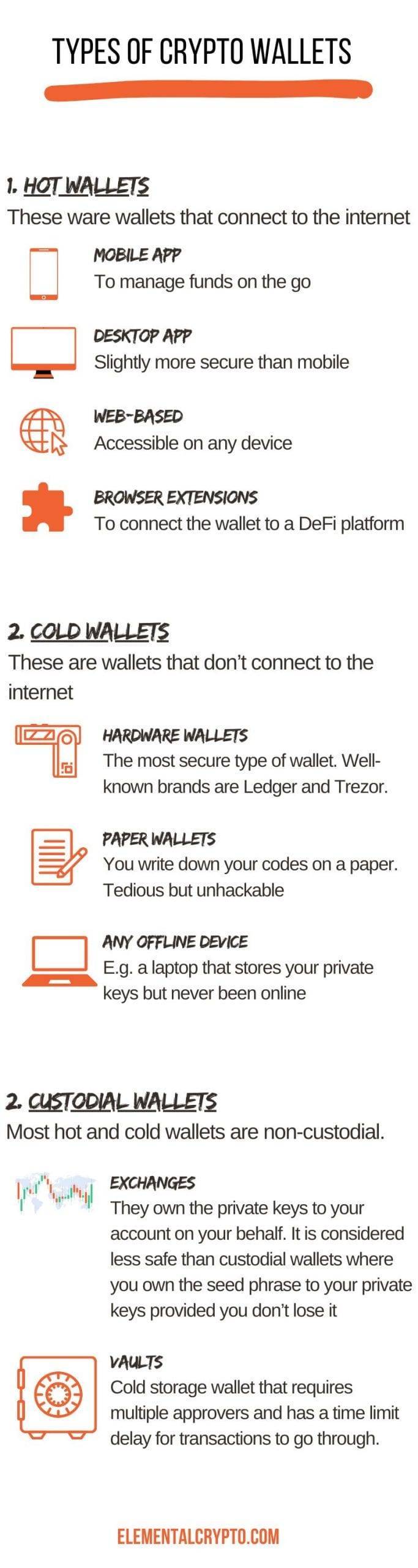
When choosing a wallet you will likely end up with more than one wallet. In general, this is a good practice (see why here). Let’s take a look at the different types of wallets available.
1. Desktop Wallets
Desktop wallets are software applications that can be installed on your computer. They provide complete control over your Monero holdings and are considered safer than mobile phone wallets whose SIM cards can be hijacked. However, they are not as safe as hardware wallets because they are connected to the internet.
2. Mobile Wallets
Mobile wallets offer convenience and accessibility, allowing you to manage your Monero coins on the go. They are considered the least safe of all options so you don’t want to store your life’s savings on them.
3. Web-Based Wallets
Web-based wallets, also known as online wallets, function within a web browser, eliminating the need for downloading software. These wallets provide easy access to your Monero holdings from any device with an internet connection. While web-based wallets offer convenience, they rely on third-party service providers, which can introduce some level of risk due to potential security vulnerabilities.
4. Hardware Wallets
Hardware wallets are physical devices specifically designed to provide enhanced security for your Monero coins. These wallets store your private keys offline, reducing the risk of exposure to malware or hacking attempts. Hardware wallets are considered the safest option for storing your crypto for the long term.
5. Exchange Wallets
Exchange wallets are provided by cryptocurrency exchanges and are primarily used for trading purposes. These wallets allow you to store your Monero coins on the exchange platform, making it convenient to buy, sell, and trade cryptocurrencies. However, it’s important to note that exchange wallets come with a higher level of risk, as they are susceptible to hacking and security breaches. They are also custodial meaning you don’t have access to your private keys.
6. Paper Wallets
Paper wallets are a type of offline wallet that involves printing your Monero private keys or seed phrase on a physical medium, such as paper. By storing your keys separately from digital devices, paper wallets offer excellent protection against online threats. However, they require caution and proper storage to avoid loss or damage.
7. Cold Storage Wallets
Cold wallets, also known as offline wallets, are designed to keep your Monero coins completely offline, away from any internet connection. These wallets provide the highest level of security, as they are not vulnerable to online threats. Cold storage wallets can be in the form of hardware wallets, paper wallets, or even offline computer systems specifically dedicated to storing cryptocurrencies.
8. Extensions
A wallet extension is a Chrome browser extension that allows you to connect your wallet to compatible DeFi platforms. For example, say I have some Ethereum in my wallet that I want to use as collateral to take out a loan. I could visit a defi platform such as Compound and connect my wallet via the extension to deposit my ETH and take out a loan.
Methodology
I scored each wallet across 14 dimensions. My method scores wallets on their breadth of support. Some, especially Monero users, may not agree with this because the more complexity a wallet has the larger the attack surface. But from my perspective, I am scoring wallets on whether they can cover my every need and make life easy. The only exception to this rule is for hardware wallets which have a larger weight in my rating system because they are much more secure.
- Devices: 1 point each for desktop, android, iOS, web
- Languages: 1 point if it supports more than English
- Multi-crypto support: 1 point
- Built-in exchange: 1 point
- Option to stake from within the wallet: 1 point
- Multi-sig: 1 points.
- Hardware wallet enabled: 1 point
- Ability to buy crypto with fiat from within the wallet: 1 point
- Does it include an NFT gallery: 1 point
- User experience: scored on a 5-point rating scale based on my previous experience as a UX consultant
- Open source: 1 point
- Non-custodial: 1 point
- Fees: most wallets charge surcharges for third-party integrations and network fees. Since that is common across wallets I do not deduct any points. I deduct points for subscription fees (1 point), purchase cost (-0.5 point), or very high fees (2 points) as in the case of Guarda.
- Web 3 integration either because it has a browser extension or because it has an inbuilt Web3 tab within the wallet: 1 point
- Hardware wallet: extra point added to final rating
Up Next
Should You Have Multiple Wallets: Yes and Here Is Why

Are you wondering whether you should use multiple crypto wallets or one wallet to rule them all? Using many wallets means you need to manage multiple seed phrases and makes it hard to keep track of your total portfolio. Using a single wallet exposes you to more risk. What if you get hacked or lose your seed phrase? What if you lose your device if you use a hardware wallet? Is there even a single wallet that can accommodate everything you want to do with your crypto assets? Having used more than 17 different wallets, I guarantee you that you will end up using many wallets yourself as you become better acquainted with the world of crypto. Read more.