
This post teaches you how to scan a QR code on Coinbase.
Manually entering a BTC address or any other crypto address in a form can be both tedious and error-prone.
The most convenient way is to scan the QR code of a given crypto address using a QR Code Scanner.
Coinbase account has a QR option. You can either use the Coinbase app on your mobile device or open the Coinbase website URL to access the web app.
Coinbase QR Code use cases
Coinbase QR Codes are used for various purposes. The following are some of them:
- Account access authentication
- Interlinking accounts
- Making payments
- Making account transfers
Authenticating your Coinbase account using a QR Code
Before employing the other mentioned use cases, it is important to secure your Coinbase account.
Using a QR-based authenticator app is a fast, secure, and convenient way to access your Coinbase account. The following are the major authenticator apps that you can use on Coinbase:
- Google Authenticator app
- Microsoft Authenticator app
Google authenticator app is by far the most widely used. Thus, we are going to explore how to use it.
The following are the main steps you need to take:
1. Go to security settings
Do the following:
(a) Select settings

(b) Go to security
When you open ‘Settings’, multiple setting options will be displayed. Click the Security tab to select the Security option as shown below:

2. Navigate to the 2-Step verification section
Under ‘Settings’, go to the 2-step verification section. This will appear as below:

3. Select Authenticator
Within the 2-step verification section, select ‘Authenticator’ as shown in the diagram below:

4. Enter the 2-step verification code sent to you
Once you’re done selecting the 2-step verification, you will be sent a confirmation code.
Enter the confirmation code within the space provided, as shown in the diagram below:

5. Enable the Authenticator support
Upon confirmation of the verification code, you will be requested to enable the Authenticator support, as shown in the diagram below:

Interlinking Coinbase with your various dApp accounts using a QR Code
You can link the Coinbase wallet app to your Web3 wallet on your dApp site. To demonstrate this, let’s use Uniswap as an example.
1. Go to your dApp site (Uniswap)

2. Interlink your Coinbase account with your dApp wallet
To be able to make transactions between your Coinbase wallet app and your dApp wallet on other platforms, you need to interlink the two apps.
As a demonstration, let’s use Uniswap – the most popular crypto asset swapping dApp. To this, follow the steps below:
(a) Go to your Uniswap Account interface

(b) Select a pair of tokens to be swapped

After selecting your chosen pairs to swap (in our case, ETH and USDT), the interface will appear as shown below:

(c) Connect your Coinbase wallet

(d) Scan your Coinbase wallet address

Making a payment using the Coinbase QR Code
When you buy goods and services, you need to make payment. The easiest way to make payments from your Coinbase wallet is to use the Coinbase QR Code scanner.
1. Point-of-Sale QR Code payment

At the Point-of-Sale (e.g., shopping stall), a printed-out QR code is displayed on the wall, counter, or cash machine. Simply scan this printed-out QR code to capture the recipient’s Bitcoin address.
2. Person-to-Person QR Code payment

During personal selling, a printed-out QR code may not be available or necessary. Thus, instead, the recipient’s QR code can be displayed on the person’s computer screen or cell phone screen.
The person receiving payment will simply go to the mobile app and display the QR Code of his wallet address on the screen. Then, the person making the payment will get close enough to scan the displayed QR Code to capture this wallet address and then enter the requested payment amount.
Using Coinbase QR Code to make transfers
Making crypto transfers could either be receiving cryptos or sending cryptos.
1. Receive crypto using the Coinbase QR Code
To receive crypto using the Coinbase QR Code app, implement the following steps:
(a) Login to your Coinbase account

2. Tap on the ‘Send and Receive’ button
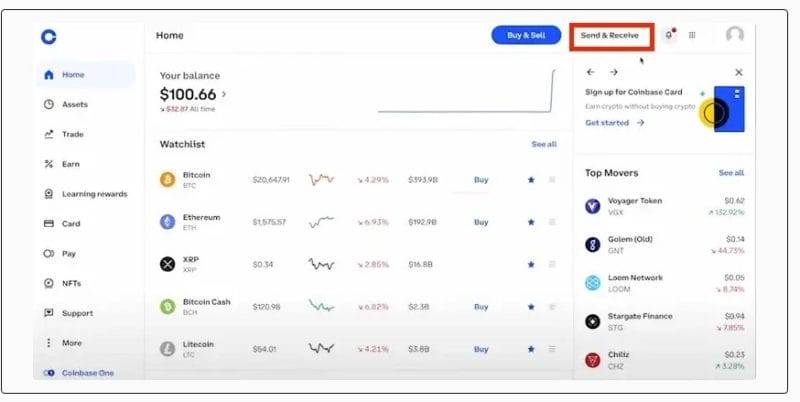
(c) Select the ‘Receive’ button
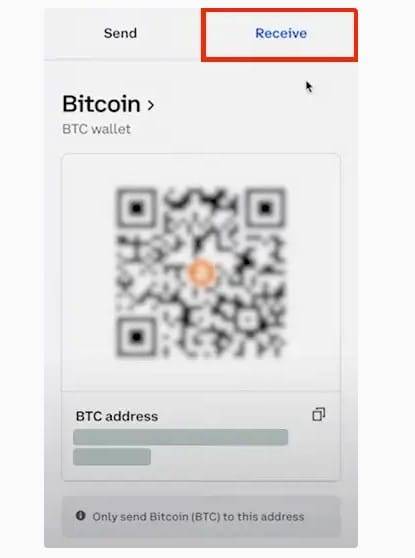
(d) Choose the receiving asset’s Network

2. Send crypto using Coinbase QR Code
To send crypto using the Coinbase QR Code app, implement the following steps:
(a) Login to your Coinbase account

(b) Select the ‘Send’ button

(c) Get the receiver’s QR Code, scan it, and proceed to send the crypto
You can now send crypto to the recipient’s wallet address.
Why you shouldn’t ignore QR Code
Sometimes, due to various excuses, we often ignore using QR Codes in capturing data required for our crypto transactions.
The following compelling reasons should dissuade us from ignoring the QR Code facility:
1. QR Code can make you wealthier
Time is wealth. Consider the enormous amount of time you would spend physically entering your 32-character Bitcoin wallet address into your Bitcoin wallet app using your fingers. It would take about 15 seconds to enter plus 5-10 more seconds to confirm the entry.
Imagine a situation where you are pushed to enter a 24-word seed phrase as a security measure simply because you’ve made too many entry errors. You may end up spending several minutes to complete the entries. A Bitcoin QR Code scanner would have taken just about 1 second!
In cryptocurrency trading, saving just a second could mean saving hundreds of dollars. Think of failing to take advantage of a 0.05% bitcoin price rise within a minute simply because you wasted that time manually entering your Bitcoin address. At a BTC price of $20,000 that would translate to a loss of $1,000 in a minute! While this is a hypothetical scenario, it isn’t impossible in the world of cryptocurrencies.
2. QR Code can save you money
Errors are costly. Think of how much you would lose if you erroneously sent 20 BTC to the wrong Bitcoin address. At a BTC price of $20,000 per BTC, that would be an irrecoverable loss of $400,000. Such an error wouldn’t have happened if you had used a QR Code scanner to capture the Bitcoin address.
3. QR Code can save you from danger
Prying eyes are dangerous! Imagine your Bitcoin private key is exposed to the naked eyes of a thief next to you. The chances that the thief will quickly record the private key are high. The Bitcoin QR Code obfuscates your private keys from prying eyes. QR Code can also obfuscate your contact information from prying eyes.
While the thief can scan the Bitcoin QR Code, you can take additional security measures to prevent this. For example, you can install a dynamic random QR Codes generator that can disguise the true QR Code or require additional measures such as entering a password to decode the right QR Code.
4. No better memory than the QR Code
It is almost humanly impossible to memorize a 32-character Bitcoin address. Add to it your wallet’s 24-word seed phrase. And that becomes close to impossible. Yet, QR Codes can safely store this in a pictorial memory – either in soft copy or hard copy.
Thus, a QR Code is the best way to store backup codes for your crypto addresses. Furthermore, you can distinguish one backup code from another through color coding. Colorful QR Code is not just appealing to the eye but can also serve as a unique identifier that enables you to distinguish one backup code from another.
5. QR Code scanner is easily available
The Coinbase QR Code scanner is available on the Coinbase app on both the Android device and the App Store. As I have demonstrated in this post, no justifiable reason exists that can make you avoid using it. Using QR Codes is undoubtedly one of the best practices that you should nurture as a habit.
Up Next
What Is a Coinbase Vault and Is It Any Good for Storage?

A Coinbase Vault is an augmented security feature for Coinbase.com users who want to store their crypto assets more safely. In this post I do a complete review of Coinbase’s vaults: I will tell you what they are, how they work, and whether they are worth it. Read more.
How to Set Limit Order on Coinbase App in 6 Steps

Hey, this is a quick guide on how to set a limit order on the Coinbase mobile app in 6 easy steps. Let’s dive into it. Read more.
What Is a Crypto Address? Don’t Make My Costly Mistake

A crypto address is a unique string of characters that represents a specific wallet on a blockchain network. It can be used to send and receive crypto assets, just like a bank account number or email address. At first, it can feel daunting to get your head around the concept but in this guide, I will break everything down into baby steps. Ready? Let’s dig into it. Continue reading.